
Across engineering and program roles, I have run into a problem that probably sounds familiar to anyone who has managed complex work. The example below combines recurring coordination patterns and omits project-specific details.
The information existed. That was not the problem.
One person had a supplier update. Another function had a gating item buried in a tracker. Someone else had an important dependency sitting in meeting notes. And, naturally, everybody needed a slightly different view of the work depending on what they owned.
So the usual solution was more coordination.
More follow-up emails. More meetings. More time spent collecting updates, cleaning them up, and pushing them back out.
I have done plenty of that over the years. It works. But it is also a lot of muda — waste that does not necessarily improve the underlying engineering work.
That was the problem I wanted AI to help with.
Not the engineering decision. Not whether something was safe. Not whether a verification result was acceptable. And definitely not whether we should commit to a date.
I wanted AI to take some of the information-processing burden off the team so that the humans could spend more time on the work that actually requires humans.
That distinction has become the way I think about AI in program management:
Automate the repeatable information work. Keep the consequential human work human.
That sounds simple. In practice, it has changed the way I build dashboards, run launch-readiness reviews, collect updates, and share project knowledge.
The dashboard was useful because it changed how information moved
Before I built AI-assisted dashboards and project agents, a lot of information moved through the team manually.
I would collect updates through meetings, email, conversations, and different documents. Then I or another team member would consolidate the information and push it back out.
Sometimes that meant a large team meeting. Sometimes it meant a one-on-one follow-up. Sometimes it meant sending somebody a message because one small item had become a gating issue.
The funny thing is that a lot of those updates were not relevant to everyone.
Yet everybody could still end up sitting through the meeting.
The dashboard changed the model from push to pull.
Instead of forcing every update through another person, we created a place where the relevant stakeholder could see the status directly.
For a launch-readiness workflow, that meant breaking the final objective into the steps required to get there and making the critical information visible:
| What the team needed to know | What the dashboard showed |
|---|---|
| Who owns this? | Responsible person |
| When do we need it? | Target due date |
| What could stop us? | Gating item / bottleneck |
| What are we waiting on? | Cross-functional inputs |
| Where are we now? | Current status |
| What needs attention? | Open issue or dependency |
Consider a common illustration: a downstream activity cannot start until an external team supplies a required input.
That is not a glamorous project-management problem. But launch execution is full of details like this.
If the information is missing, the downstream process can stop. If it is visible early enough, somebody can act before it turns into a fire drill.
Instead of repeatedly asking whether the input arrived, the dashboard can show its status, owner, and effect on the next step.
That is where AI became genuinely useful to me.
It could help collect and organize repetitive inputs, surface missing information, support reminders, and feed a common view of the program.
The value was not that AI created a prettier dashboard.
The value was that fewer people had to spend their time manually moving information from one place to another.
I would rather over-communicate than discover a hidden problem late
I generally believe under-communication carries more operational risk than over-communication.
Over-communication has costs too: it can waste attention, bury urgent signals, or share details with people who do not need them.
If I under-communicate, I can miss a dependency, discover a bottleneck late, or leave somebody making a decision with incomplete information.
The problem, of course, is that “communicate more” can quickly turn into “schedule more meetings.”
That is not what I want either.
A shared dashboard gave us a middle ground. The information could remain available without requiring every person to sit through every update.
And once the information was available in a structured form, project-specific agents could make it even easier to retrieve.
A team member could ask a question relevant to his or her work instead of waiting for the next status meeting or tracking me down.
That is not just a productivity tool. Done well, it starts to become a form of project memory.
People can retrieve knowledge from earlier decisions, status updates, and project history without everything living inside the head of one program manager.

The four things I actually want AI doing
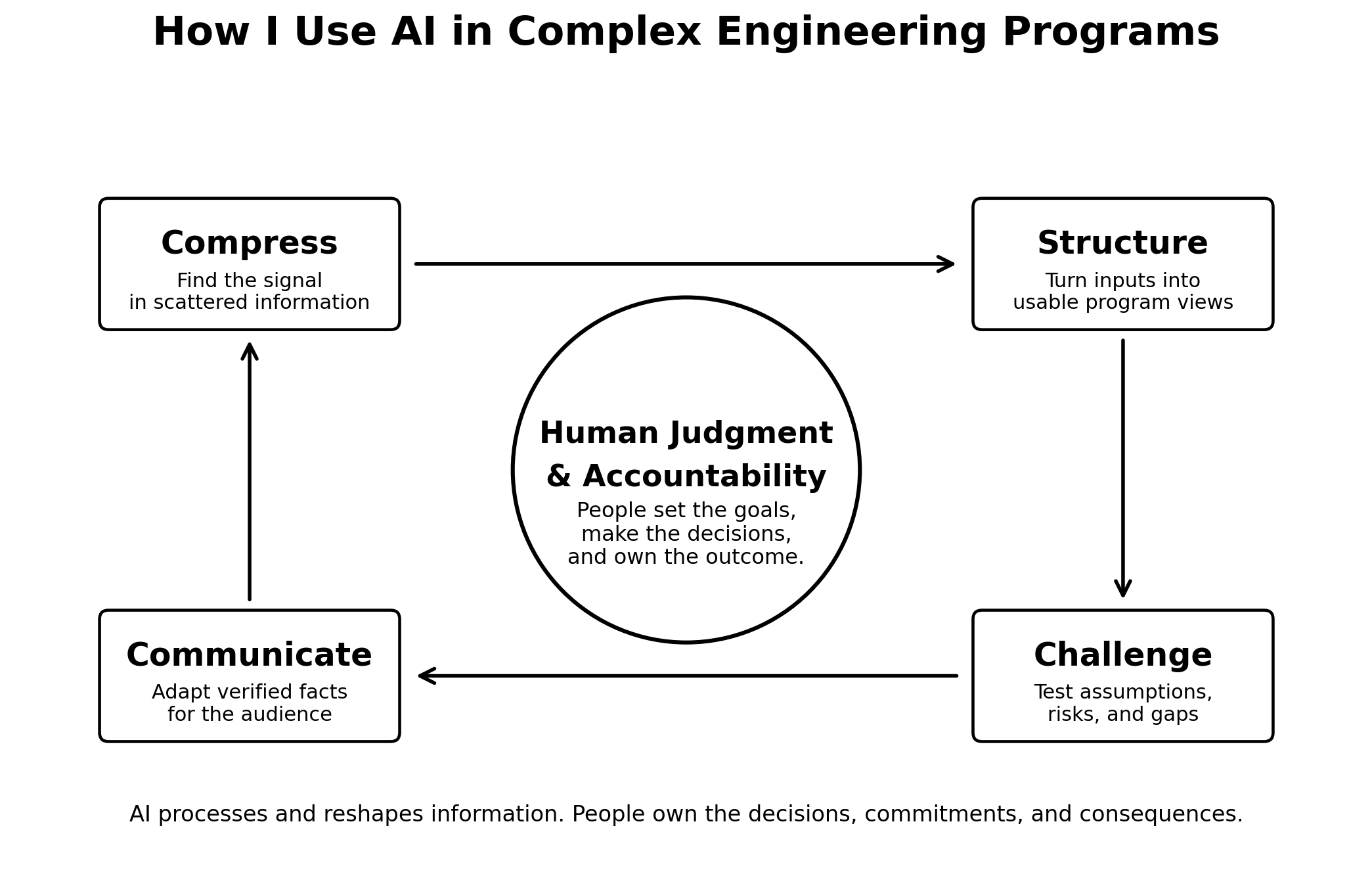
After experimenting with these workflows, I have found that most of the value falls into four buckets.
1. Compress
A complicated program produces an absurd amount of text.
Meeting notes. Risk logs. Schedules. Test discussions. Design reviews. Email threads. Action trackers.
I do not need AI to “manage the program.” I need it to help me find the signal.
A useful prompt is much narrower:
Review these notes as a program-management analyst.

Do not invent missing information.

Return:
1. Decisions made
2. New or changed risks
3. Schedule or dependency changes
4. Actions with owner and due date
5. Contradictions or unresolved items
6. Questions I should verify with the team

For each item, identify the supporting source.
If the source does not support a conclusion, mark it as uncertain.
That last part matters.
I am not looking for confident prose. I am looking for traceability.
2. Structure
Technical teams do not naturally speak the same language.
Engineering may be thinking about requirements and design maturity. Quality may be thinking about evidence and compliance. Operations may be thinking about readiness and process capability. Leadership usually wants to know what changed, what is at risk, and what decision is needed.
A program manager spends a lot of time translating between those views.
AI can help turn an unstructured discussion into a first-pass program model:
| Messy input | Useful first-pass output |
|---|---|
| Meeting notes | Decisions, actions, risks |
| Issue discussion | Problem, owner, containment, next evidence |
| Schedule conversation | Dependencies and assumptions |
| Design-review notes | Open questions grouped by subsystem/function |
| Test discussion | Requirement → evidence → gap |
| Leadership questions | Decision request + concise context |
But I still treat that output as a draft model, not the source of truth.
If AI says a risk is closed and the responsible engineer has not agreed, the risk is not closed.
If AI proposes a date that is not in the approved schedule, that date does not magically exist.
A polished sentence is still wrong if the underlying context is wrong.
3. Challenge
This is where AI gets more interesting.
Once the program is reasonably structured, I can ask it to act like a skeptical reviewer.
What dependencies look fragile?
Which assumptions are being treated as facts?
Which risks have mitigation plans but no clear triggers?
Which milestones depend on something that nobody has actually demonstrated yet?
This does not mean the AI knows more than the subject-matter experts. Usually it does not.
But generating a second set of questions is cheap.
And occasionally one of those questions exposes something worth discussing.
That can be especially useful in cross-functional work because the risk is often hiding between functions, not neatly inside one person’s scope.
4. Communicate
The same facts need to be communicated very differently depending on the audience.
The working team may need twenty action items.
A senior leader may need three things:
- What changed?
- What is the impact?
- What decision or support is needed?
AI is good at changing the format.
What I do not want it doing is changing the facts.
My preferred sequence is:
- Establish the verified source information.
- Lock the facts.
- Let AI help adapt the message for the audience.
- Personally review anything involving commitments, risk, dates, technical conclusions, or escalation.
That keeps AI in the role I want: communication assistant, not accountable leader.
The part people miss: AI can miss decisive project context
This sounds obvious until you watch a very reasonable AI answer become wrong because of one missing conversation.
I have seen exactly that.
Imagine a project has a documented set of information, but a separate meeting takes place and the team makes a critical decision. For whatever reason, that decision never makes it into the material the AI can access.
Now ask the AI for a recommendation.
It may produce something that looks completely logical.
The problem is that it is logically working from an incomplete world.
A person who was in the meeting can immediately say, “No, we already decided that,” or “That assumption changed.”
Once that context is added, the output improves.
That experience reinforced something I already believed from engineering work: context is part of the data.
A spreadsheet can be technically complete and still be misleading if nobody explains that one line is a placeholder, one expense was classified unusually, or one external data point does not apply to this program.
AI makes this easier to forget because the output often sounds so certain.
So the more consequential the result, the more aggressively I verify it.
For something routine, that may be a quick source check.
For something that could influence a program decision, I am checking the input, the context, and the conclusion. Sometimes twice. Sometimes three times.
This is where I draw the line
There is a pretty simple pattern to the work I am comfortable automating.
If the task is repetitive, structured, and easy to verify, I am interested.
If the same type of input arrives every week and we perform essentially the same analysis every week, AI should probably help.
If the work involves empathy, accountability, a difficult conversation, or a judgment that changes somebody else’s next move, I want a person involved.
That line matters.
At the end of the day, we still work with other human beings.
When a team makes an important decision, I want the accountable person explaining why.
When somebody is being asked to change direction, I want the person communicating that decision to understand how it affects the other side.
When there is uncertainty or conflict, there is often information in tone, history, trust, and organizational context that never appears in a clean project document.
AI can draft the message.
I still want the human to deliver the meaning.
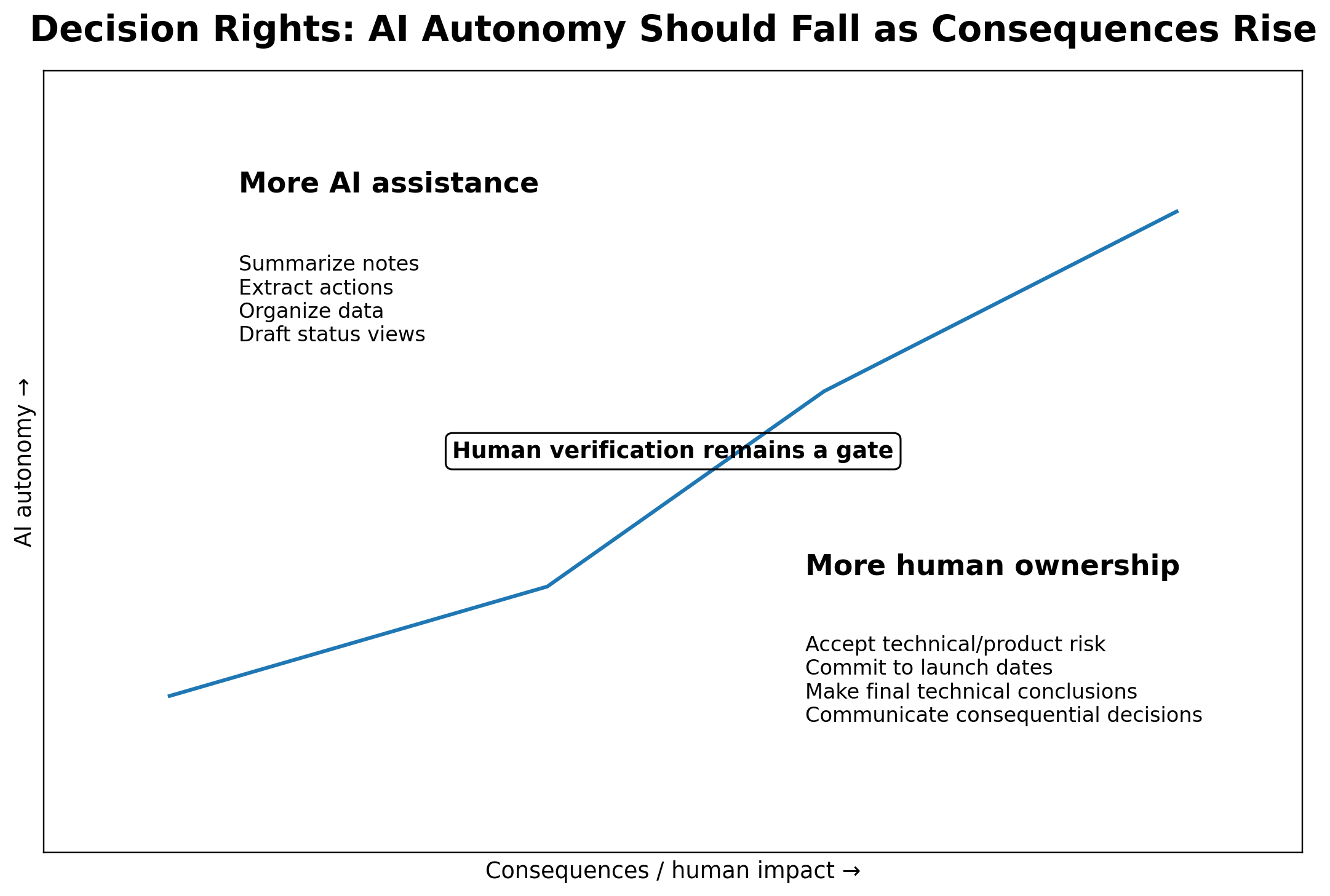
Here is roughly how I think about it:
| Task | AI can help? | Human verifies? | Human owns the final call? |
|---|---|---|---|
| Summarize meeting notes | Yes | Yes | Yes |
| Extract action items | Yes | Yes | Yes |
| Generate risk-review questions | Yes | Yes | Yes |
| Build a status dashboard | Yes | Yes | Yes |
| Suggest schedule scenarios | Yes | Yes | Yes |
| Accept product or technical risk | Assist only | Yes | Yes |
| Commit to a launch date | Assist only | Yes | Yes |
| Make a final technical conclusion | Assist only | Yes | Qualified human |
| Communicate a consequential decision | Draft/support | Yes | Yes |
The research is encouraging, but I would not oversell it
There is real evidence that generative AI can reduce parts of the knowledge-work burden.
Microsoft researchers ran a randomized field experiment involving roughly 6,000 knowledge workers. Active users of an integrated generative-AI tool spent about three fewer hours per week on email. The intent-to-treat estimate was smaller — about 1.4 hours per week — and meeting time did not significantly change.
That last point is interesting to me.
AI can make individual information work faster. That does not automatically redesign how an organization coordinates.
PMI’s 2025 Project Professional’s GenAI Journey found a similarly large difference between frequent, mature users and lower-adoption users. In its survey, 48% of “Trailblazers” reported advanced productivity gains versus 3% of “Explorers.” Trailblazers were also much more likely to say they “very frequently” experimented with new GenAI applications (58% versus 12%).
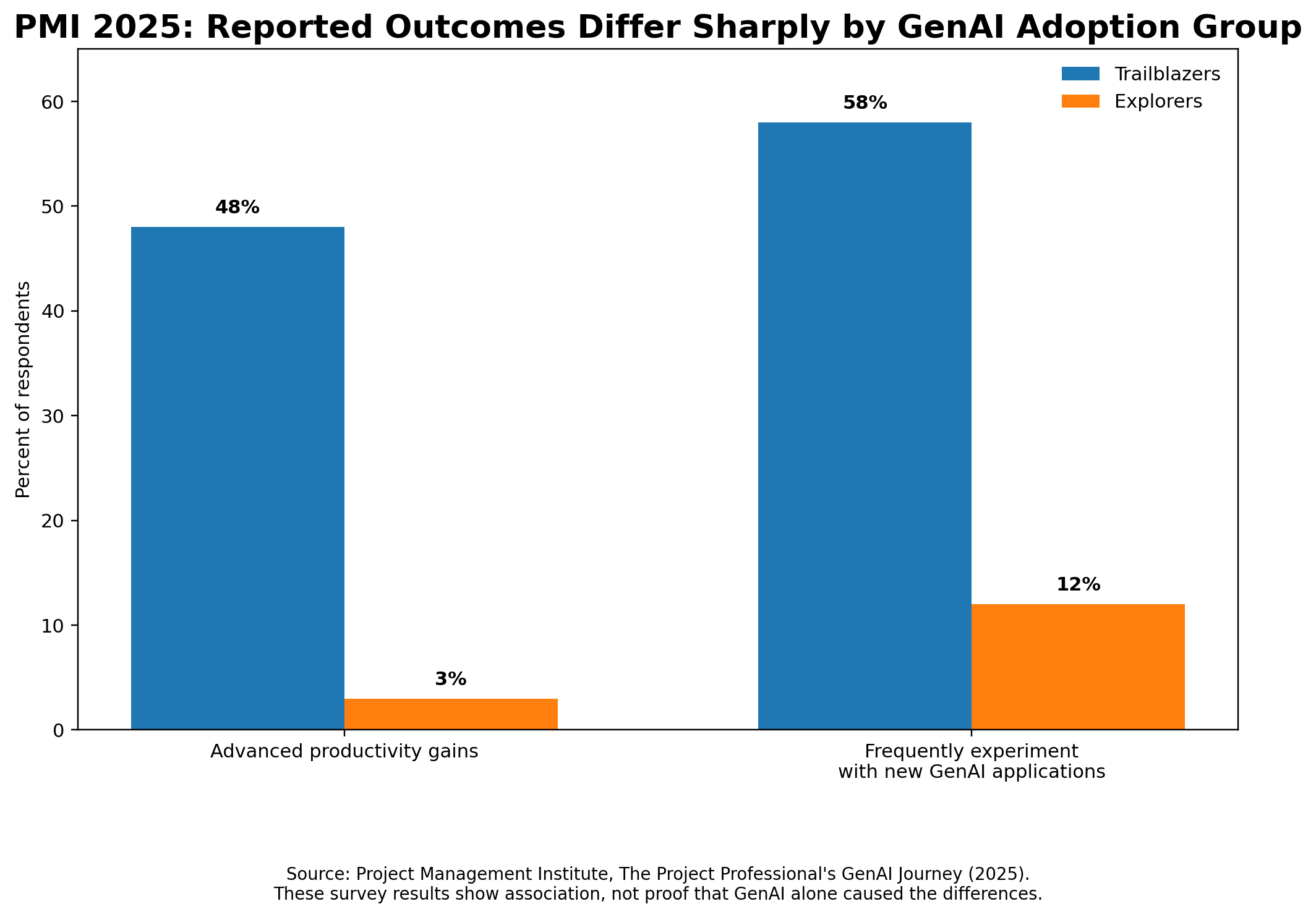
I would not read those numbers as proof that AI alone created the productivity difference.
People who experiment more may also have better organizational support, better workflows, or simply more curiosity about technology.
But that actually reinforces the point.
The advantage is probably not “having access to AI.”
The advantage is redesigning a workflow so that AI takes away low-value information work without taking away the human judgment you still need.
For a step-by-step application, see how I turn meeting notes into executive updates with AI.
Sources
- Project Management Institute, The Project Professional’s GenAI Journey (March 2025)
- Microsoft Research, Shifting Work Patterns with Generative AI (April 2025)
If you want to try this, do not start with “AI transformation”
Start with one annoying recurring workflow.
Seriously.
Pick the thing your team already has to do every week:
- status updates
- meeting actions
- risk reviews
- decision logs
- executive summaries
Then ask four questions.
What takes the most manual time?
Maybe it is consolidating notes.
What part is repetitive?
Maybe it is turning five sources into the same status format.
What can be checked against a source?
That is a much safer place to use AI.
What still requires judgment?
Keep that part human.
I would rather automate 20% of one real workflow and trust it than automate 80% of a process nobody fully understands.
A simple scorecard can help:
| Question | Poor fit for AI assistance | Better fit |
|---|---|---|
| Is the task repetitive? | Rare / one-off | Frequent |
| Is the input reasonably structured? | Highly ambiguous | Mostly text/data |
| Can the output be verified? | Hard to check | Traceable to source |
| Is an error reversible? | High consequence | Reviewable before action |
| Does it consume coordination time? | Minimal | Significant |
| Does a qualified person remain accountable? | No | Yes |
The more answers that land in the right-hand column, the more interested I become.
What I hope AI gives me back
I do not really care whether AI saves me thirty seconds writing an email.
What I care about is getting back the attention that gets burned on coordination.
If a dashboard means fewer manual follow-ups, good.
If a project agent means somebody can find an answer without another meeting, even better.
If AI helps expose a bottleneck two days earlier and gives the team time to react, that is where the value starts to compound.
But I am not looking for an autonomous program manager.
The work I most want to keep is the work that requires judgment, trust, empathy, and accountability.
That is the part of program management that matters most anyway.
So my rule remains pretty simple:
Let AI process more of the information. Let people own the decisions.
That is not as flashy as “AI will run your projects for you.”
I am fine with that.
It is also a workflow I am actually willing to trust.
If you are coordinating a technical program and want to compare approaches, see Work with Peter.

Leave a Reply