
A meeting ends at 3:00 p.m.
You have twelve pages of transcript, six action items, two unresolved technical questions, one schedule concern, and at least three comments that sounded important in the moment but probably do not belong anywhere near an executive update.
Then somebody asks:
“Can you send leadership a quick summary?”
That is where a deceptively hard piece of program management begins.
When I moved from orthopedic engineering into project management at Hospital for Special Surgery, I learned that the most useful update was rarely the longest one. The hard part was distinguishing a technical observation, a proposed action, and a decision someone had actually made.
The problem is not summarizing the meeting.
The problem is deciding what deserves to survive the summary.
An executive usually does not need the sequence of the conversation. They need to know what changed, why it matters, what the team is doing, and whether they need to make a decision.
Those are very different outputs.
This is one of the places where I find AI genuinely useful — not because I want it deciding what leadership should care about, but because it can reduce the mechanical work required to get from a messy conversation to a structured first draft.
My rule is similar to the one I use for broader program-management workflows:
Let AI compress the information. Keep the judgment human.
That distinction sounds small. It changes the entire workflow.
A transcript is not an executive update
This is probably the first mistake people make when they start using AI for meeting summaries.
They give the model a transcript and ask:
“Summarize this meeting for leadership.”
Sometimes the result sounds great.
It may even sound better than the actual meeting.
That is also the problem.
A language model is very good at producing a coherent narrative. Program work is not always coherent.
Maybe the team discussed three possible schedule paths, but approved none of them.
Maybe somebody casually mentioned a risk without owning it.
Maybe the phrase “we should be okay” referred to one subsystem, not the entire launch.
Maybe a due date was suggested but never committed.
A polished summary can flatten those distinctions.
That is why I do not want AI jumping directly from transcript to executive communication.
I want an intermediate layer first.
The five-step workflow I would use
The workflow I would use is:
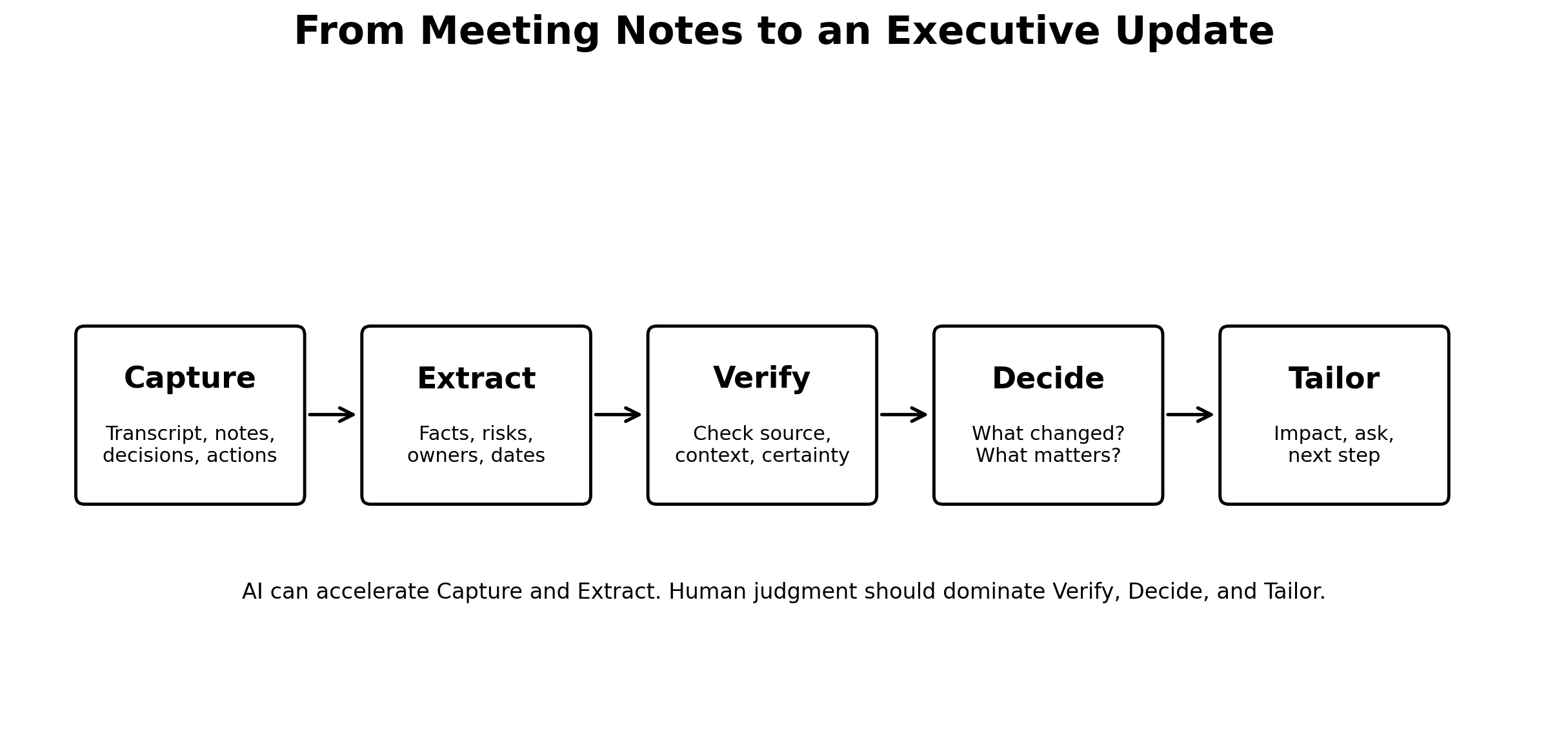
Capture → Extract → Verify → Decide → Tailor
The first two steps are where AI does the most work.
The last three are where I want the program manager, technical lead, or accountable decision-maker to take control.
1. Capture the raw material
The input might be:
- meeting notes
- a transcript
- action-item lists
- chat messages
- screenshots
- schedule excerpts
- a risk register
- follow-up email
I do not assume one source contains the full truth.
That matters because meetings often reference information that exists somewhere else.
Someone might say, “The latest test result looks good.”
That sentence is not the test result.
Someone might say, “Operations can recover the schedule.”
That is not the recovery plan.
Someone might say, “Leadership already agreed.”
That is not necessarily a documented decision.
The meeting is one source of evidence, not the entire program.
2. Extract before you summarize
Instead of asking AI for an executive summary immediately, I first ask it to extract structured information.
A prompt might look like this:
Review these meeting notes as a program-management analyst.

Do not create an executive summary yet.

Extract only information supported by the notes.

Return:
1. Decisions explicitly made
2. Actions with owner and due date
3. New or changed risks
4. Schedule or dependency changes
5. Open questions
6. Items that may require leadership attention
7. Statements that sound important but are ambiguous or unsupported

For each item:
- quote or identify the supporting source
- distinguish confirmed facts from proposals or opinions
- mark missing owners or dates
- do not invent missing information
That output is less elegant.
Good.
At this stage, elegance is not what I want.
I want traceability.
Then I make AI prove what it thinks it knows
This is the part I would not skip.
NIST uses the term confabulation for cases where generative AI confidently produces erroneous or false content. The risk is especially important when people act on outputs in consequential settings.
That description matches a failure mode I care about in program work: an answer can look internally logical while still being built on missing context.
So after extraction, I run a verification pass.
I ask questions like:
- Where did this date come from?
- Was that actually a decision, or just a suggestion?
- Did the owner accept the action?
- Is the risk new, or was it already known?
- Did the team agree on the impact?
- Does the schedule implication come from the notes, or did the model infer it?
- What important claim lacks direct support?
If the source does not support a statement, I either remove it or mark it as uncertain.
This is not because I expect AI to be perfect.
I do not expect meeting notes to be perfect either.
The point is to separate captured information from program judgment.
The executive update starts only after verification
Once the facts are reasonably clean, I stop thinking like a note-taker.
Now I think like the person receiving the update.
If I am a senior leader with ten programs on my plate, what do I actually need to know?
Usually some version of four questions:
- What changed?
- Why does it matter?
- What is the team doing about it?
- What do you need from me?
That is the executive update.
Everything else is supporting detail.
The same meeting can produce two completely different documents
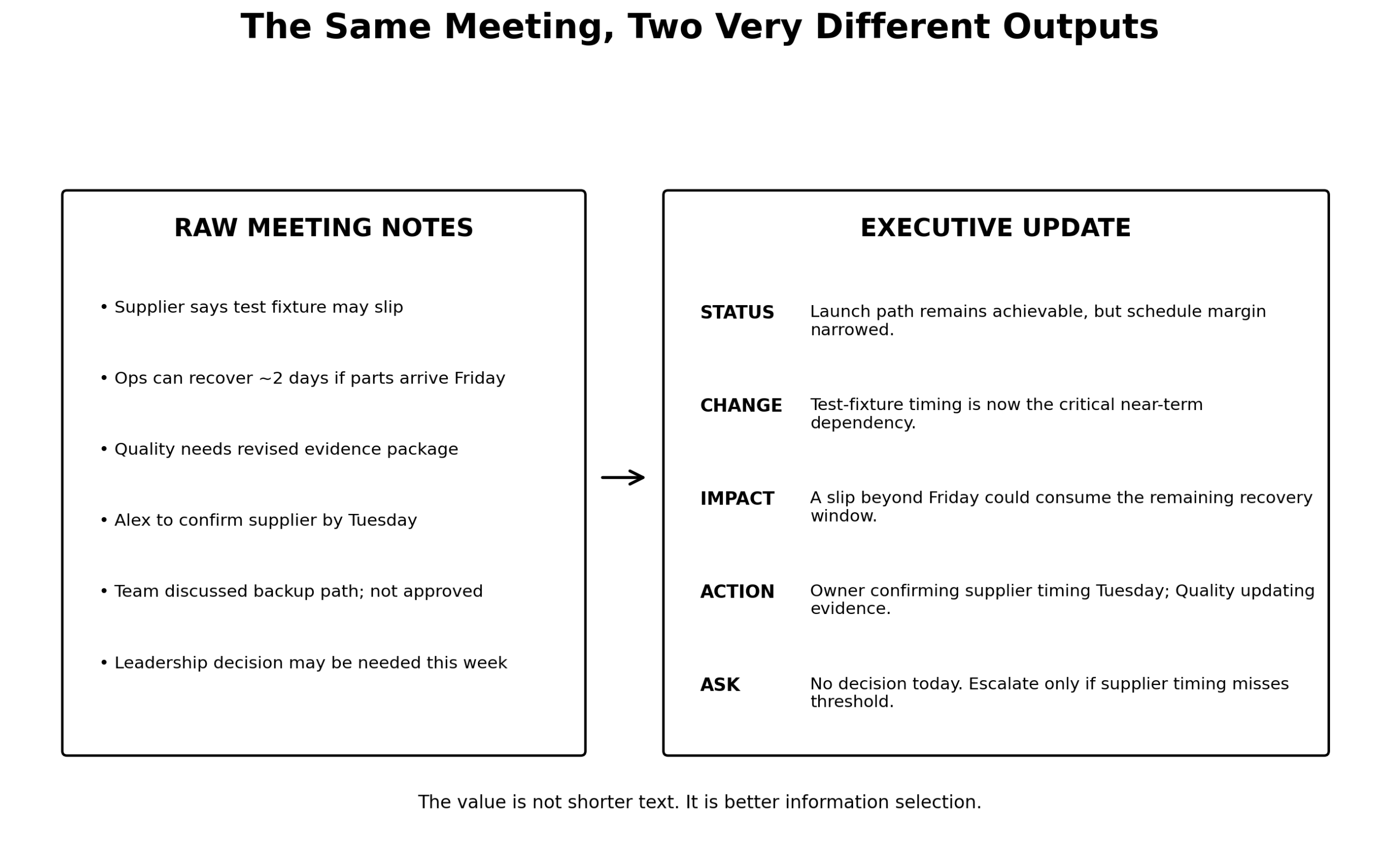
Imagine a meeting produces notes like these:
- Supplier says a test fixture may slip.
- Operations says it may be possible to recover roughly two days if parts arrive by Friday.
- Quality needs an updated evidence package.
- One person will confirm supplier timing Tuesday.
- The team discussed a backup path, but it was not approved.
- Leadership may need to get involved later this week.
Those notes are perfectly useful for the working team.
I would not send them to an executive as-is.
Those notes alone do not establish launch feasibility, the critical path, or an agreed escalation trigger. I would verify those points before writing the executive version.
For this illustrative example, assume the accountable team has additionally confirmed:
- The launch remains achievable, but schedule margin has narrowed.
- The fixture is the critical near-term dependency; the team has defined and agreed a supplier timing threshold.
- The supplier owner will confirm timing Tuesday, and Quality has accepted the evidence-package update.
- No leadership decision is needed today; escalation is required if the agreed threshold is missed.
Only with that added, verified context would I write:
Status: Launch path remains achievable, but schedule margin narrowed.
What changed: Test-fixture timing is now the critical near-term dependency.
Impact: A slip beyond the current threshold could consume the remaining recovery window.
Action: Supplier timing is being confirmed Tuesday; Quality is updating the supporting evidence.
Leadership ask: No decision today. Escalate only if the supplier misses the agreed timing threshold.
Notice what happened.
The executive version did not simply delete words.
It introduced structure.
It distinguished current state from potential impact.
It made the trigger for escalation visible.
And it explicitly said no decision is needed right now.
That last line is underrated.
A surprising amount of executive communication creates unnecessary anxiety because the reader cannot tell whether they are merely being informed or being asked to act.
“No ask” is still useful information
When I send a leadership update, I like to make the ask explicit even when there is none.
For example:
- Decision needed: Approve recovery option B by Thursday.
- Support needed: Escalation with supplier leadership.
- Awareness only: No action requested.
- Trigger-based: No action now; escalation if test completion slips beyond October 8.
That prevents a common failure mode where every update feels like an escalation.
Executives should not have to infer whether the team is in control.
A good executive update is usually asymmetric
The working team may care about twenty things.
Leadership may care deeply about three of them.
That is not because leadership is ignoring detail.
It is because their job is different.
The engineer may need the full technical mechanism.
The project manager may need owners and dates.
The executive may need impact, confidence, tradeoffs, and decision rights.
So I do not try to create one universal summary.
I keep the underlying facts fixed, then change the resolution.
That is a useful way to think about AI here.
AI is good at changing resolution.
It can turn the same verified fact set into:
- a detailed team action log
- a functional status note
- a one-paragraph executive update
- a steering-committee slide
- a decision memo
- a follow-up email
But I do not want it changing the underlying facts as it changes the format.
Meetings are already expensive enough
There is a reason I think this workflow matters.
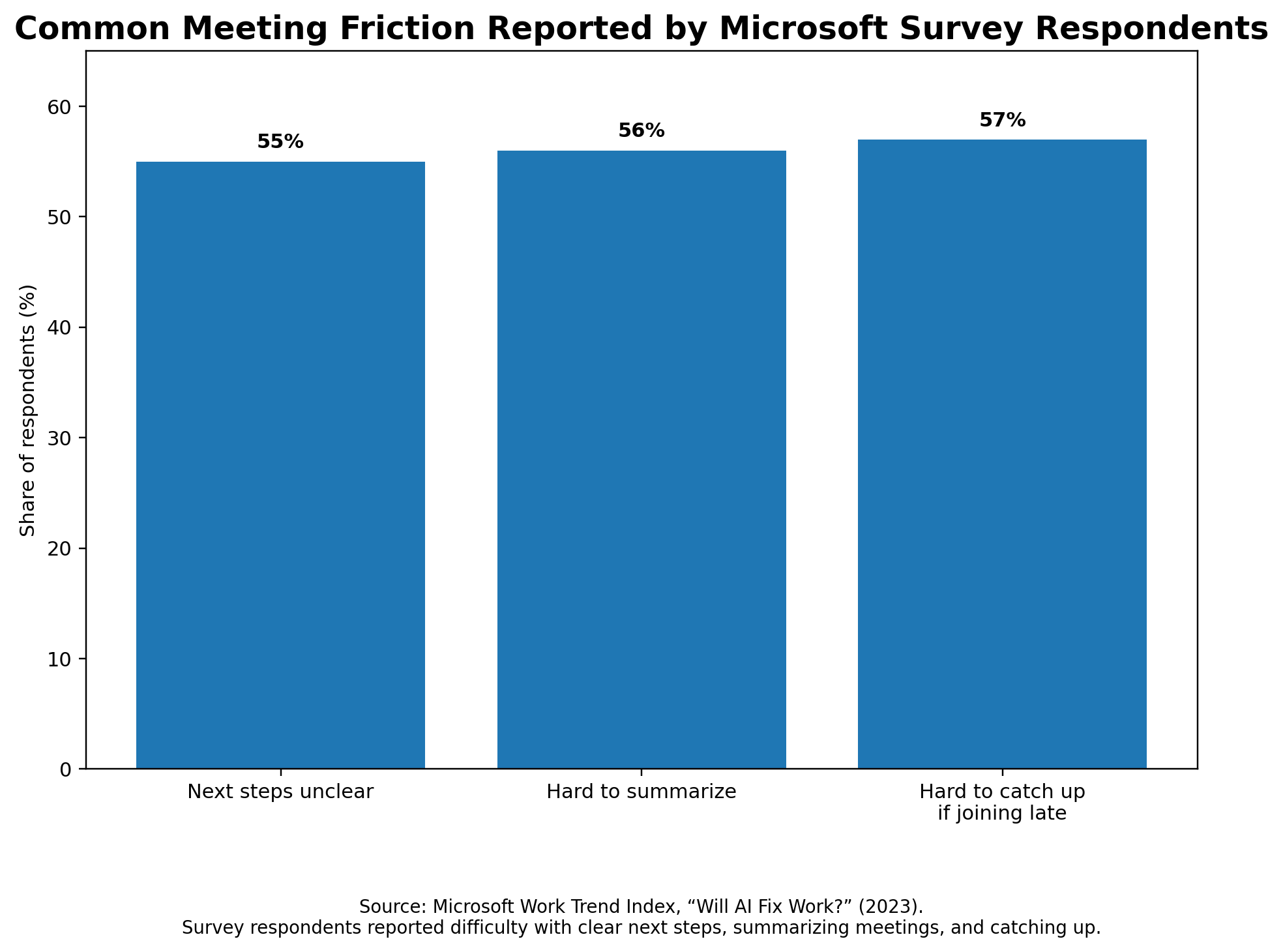
Microsoft’s 2023 Work Trend Index reported that respondents ranked inefficient meetings as their number-one productivity disruptor. In the same research, 55% said next steps at the end of meetings were unclear, 56% said it was difficult to summarize what happened, and 57% said it was hard to catch up when joining a meeting late.
Those numbers are old enough that I would not use them to claim the problem is getting worse today.
But the underlying friction remains recognizable.
Microsoft’s 2025 telemetry-based work also found that employees in its dataset were interrupted frequently by meetings, emails, and messages during the workday.
Atlassian’s 2024 meeting research found a similar pattern: 78% of surveyed knowledge workers said it was difficult to complete their work while attending all of their meetings.
The exact percentages matter less to me than the operating reality.
We already pay for the meeting once.
We should not keep paying for it afterward through:
- repeated clarification
- manual note cleanup
- duplicate status meetings
- chasing owners
- rewriting the same update for five audiences
- reconstructing why a decision was made two weeks later
That is where AI can reduce the coordination tax.
But AI does not automatically reduce meeting time
This is where I think some AI-productivity claims become too simplistic.
Microsoft researchers later ran a randomized field experiment involving roughly 6,000 knowledge workers.
People who actively used the integrated generative-AI tool spent less time on email.
But meeting time did not significantly change.
I actually like that finding because it makes intuitive sense.
A person can change how they write an email by themselves.
Reducing meetings often requires other people to change behavior too.
That is an organizational problem.
AI can make the meeting artifact better.
It can make the follow-up better.
It can reduce the need to schedule a second meeting just to redistribute information.
But it cannot single-handedly redesign a meeting culture.
That still takes management.
The one-screen executive update
If I need a practical template, this is the structure I would use.
1. What changed?
Only new information.
Not the entire project history.
Examples:
- Verification completion moved from October 5 to October 8.
- Supplier confirmed capacity constraint.
- Failure investigation identified a likely mechanism.
- Regulatory feedback changed the evidence strategy.
2. Why does it matter?
Translate the fact into program impact.
Examples:
- Reduces schedule margin from seven days to four.
- Creates a potential cost exposure.
- Changes which test must complete before the milestone.
- Introduces a customer-readiness dependency.
3. What are we doing?
Show ownership.
Examples:
- Engineering running confirmation testing.
- Operations evaluating a recovery path.
- Quality reviewing the revised evidence.
- Program team monitoring a trigger daily.
4. What do you need from leadership?
Make the decision right explicit.
Examples:
- Approve option A vs. B.
- Support escalation.
- Accept a tradeoff.
- Align two organizations.
- No action required.

The AI prompt I would use for the executive version
Only after I have verified the facts would I ask for the executive draft.
Using only the verified facts below, draft an executive project update.

Audience:
Senior leaders who understand the program but do not need detailed meeting chronology.

Format:
1. Current status — one sentence
2. What changed — maximum 3 bullets
3. Business/program impact — maximum 3 bullets
4. Actions underway — owner + next milestone
5. Leadership ask — decision, support, awareness only, or no ask
6. Watch item — one sentence if relevant

Rules:
- Do not add facts, dates, owners, risks, or conclusions.
- Preserve uncertainty exactly.
- Distinguish confirmed impact from possible impact.
- If no leadership action is required, say so explicitly.
- Use plain language.
- Remove meeting chronology unless sequence itself affects the decision.
Then I edit it.
I almost always edit it.
Not because the AI version is necessarily bad.
Because communication is part of the job.
What I remove from AI-generated executive updates
There are a few patterns I routinely look for.
False certainty
Bad:
The supplier delay will impact launch.
Better:
The supplier timing could consume the remaining schedule margin if confirmation slips beyond Friday.
The difference matters.
Generic risk language
Bad:
The team is actively mitigating the risk.
That tells me almost nothing.
Better:
Operations is evaluating a two-day recovery path; feasibility will be confirmed after Friday’s material receipt.
Too much chronology
Bad:
The team first discussed option A, then reviewed option B, and after Quality raised a concern, Engineering suggested…
Leadership usually does not need the play-by-play.
Hidden ask
Bad:
Leadership is aware of the issue.
Do you need something from leadership or not?
Say it.
AI-generated importance
This is the subtle one.
A model may decide that something “appears critical.”
That may be useful as a question.
It is not automatically a program conclusion.
I want the accountable human making that call.
The most valuable output may not be the summary
Sometimes the best thing AI gives me after a meeting is not a polished update.
It is a list of uncomfortable questions.
For example:
- Which action has no owner?
- Which date was mentioned but not committed?
- Which risk changed without being reflected in the risk register?
- Which leadership ask is implied but not stated?
- Which conclusion depends on information outside the meeting notes?
- Which item will create another meeting if we do not document it now?
Those questions can improve the underlying program before I ever write the executive update.
That is more valuable than better prose.
Communicate uncertainty instead of false confidence
There is a temptation with AI to communicate more because communication becomes cheaper.
That is not always better.
If nothing meaningful changed, I can say so briefly. Required reporting and urgent escalation still need to happen, even when the impact is uncertain.
If the facts are not mature enough, I would rather say:
“The team is still validating the impact. I will update after the Tuesday test result.”
That is better than sending a polished paragraph built on guesses.
AI lowers the cost of producing language.
It does not lower the cost of being wrong.
Where this fits into the larger workflow
In my previous article, How I Use AI to Manage Complex Engineering Programs Without Letting It Make the Decisions, I described a broader framework:
Compress → Structure → Challenge → Communicate
This meeting workflow is really a more detailed version of the last two pieces.
First, use AI to challenge the completeness and consistency of the information.
Then communicate the verified facts at the right level for the audience.
The objective is not “AI-generated executive communication.”
The objective is better information flow with less manual coordination.
That is a much more useful goal.
A simple checklist before I hit send
Before an executive update goes out, I want to be able to answer yes to these:
- Are all dates traceable to an actual source?
- Are decisions distinguished from proposals?
- Are risks distinguished from issues?
- Are possible impacts distinguished from confirmed impacts?
- Does every action have a confirmed owner, or an explicit ownership gap to resolve?
- Is the leadership ask explicit?
- Could a reader understand the update without attending the meeting?
- Did I remove details that do not change understanding or action?
- Did a human review the final wording?
- Would I be comfortable defending every sentence in the room?
If not, it is not ready.
What I want AI to save me from
I do not need AI to save me from thinking.
I want it to save me from:
- rereading twelve pages to find three decisions
- manually reformatting the same facts
- forgetting to capture an owner
- chasing an action that should have been visible already
- writing five versions of the same update
- reconstructing the meeting a week later
That is the work I am happy to automate.
The judgment stays with me.
Because the real skill in executive communication is not making information shorter.
It is knowing what the reader needs to understand, what they need to decide, and what they can safely ignore.
AI can help me get there faster.
I still want a human deciding where “there” is.
Sources
- Microsoft Work Trend Index, Will AI Fix Work? (2023)
- Microsoft Research, Shifting Work Patterns with Generative AI (April 2025)
- Microsoft WorkLab, Breaking Down the Infinite Workday (2025)
- Atlassian, Meeting Overload Is Real — Here’s What to Do About It (May 2024)
- NIST, Artificial Intelligence Risk Management Framework: Generative Artificial Intelligence Profile (2024)

Leave a Reply